ZCode JetBrains plugin brings agentic coding into JetBrains IDEs
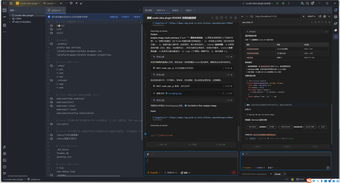
The zcode-jetbrains-plugin, created by Csuftt, connects JetBrains IDEs to the ZCode agentic environment as an in-editor coding assistant. It lets developers run agent-driven development tasks and receive model responses inside the editor, using Zhipu AI's GLM-5.2 models. The plugin keeps agent actions visible within the IDE tool window and supports multi-session interactions. It targets software engineers who want closer integration between local code and agentic automation in their JetBrains workflow.
What tasks can you actually use it for?
zcode acts as an agentic coding assistant that executes development jobs inside the IDE, producing file edits, sub-task plans, and web-driven actions when needed. It connects the editor to GLM-5.2 model endpoints through the ZCode environment and exposes the agent's steps so developers can verify what it attempts. Typical use cases include iterative code changes, scripted refactors, and retrieving web resources for build or dependency tasks.
How reliable and transparent are the model outputs?
The app delivers real-time streaming output from the underlying GLM-5.2 models and displays task and sub-agent visualization so users see autonomous actions as they happen. This visibility helps identify which automated edits the agent proposes. Generated edits and recommendations come from the model's responses and therefore require human review before merge or deployment.
What inputs and environment does it require?
zcode requires a local ZCode CLI installation and an authenticated CLI session on the same machine, and it supports JetBrains IDEs versionor higher. The plugin includes model and permission management controls to switch between GLM models and adjust agent permissions. Those prerequisites place responsibility for setup and authentication with the developer's local environment.
Does it fit into existing JetBrains workflows?
The integration sits in the IDE tool window and uses context menu commands to send code selections or files to the agent, plus a multi-tab chat interface to manage parallel sessions. The developer built the plugin as a third-party, community-driven project inspired by earlier open-source workflows, and it is actively maintained with a positive presence on the JetBrains Marketplace.
A practical choice for JetBrains developers who run local tooling
zcode is a practical option for developers who are comfortable installing and operating the ZCode CLI and who accept the need to review agentic edits. Its community-driven origins and dependency on local tooling mean teams seeking vendor-backed support or strict hosted governance should assess operational and compliance implications before adopting it into shared pipelines.